

6. Multi-Model Switching with Contact#
6.1. Goal#
Demonstrate runtime switching between pendulum models (FMU/OpenSim/FEM) during contact and evaluate the resulting trajectory.
6.2. Model Map#
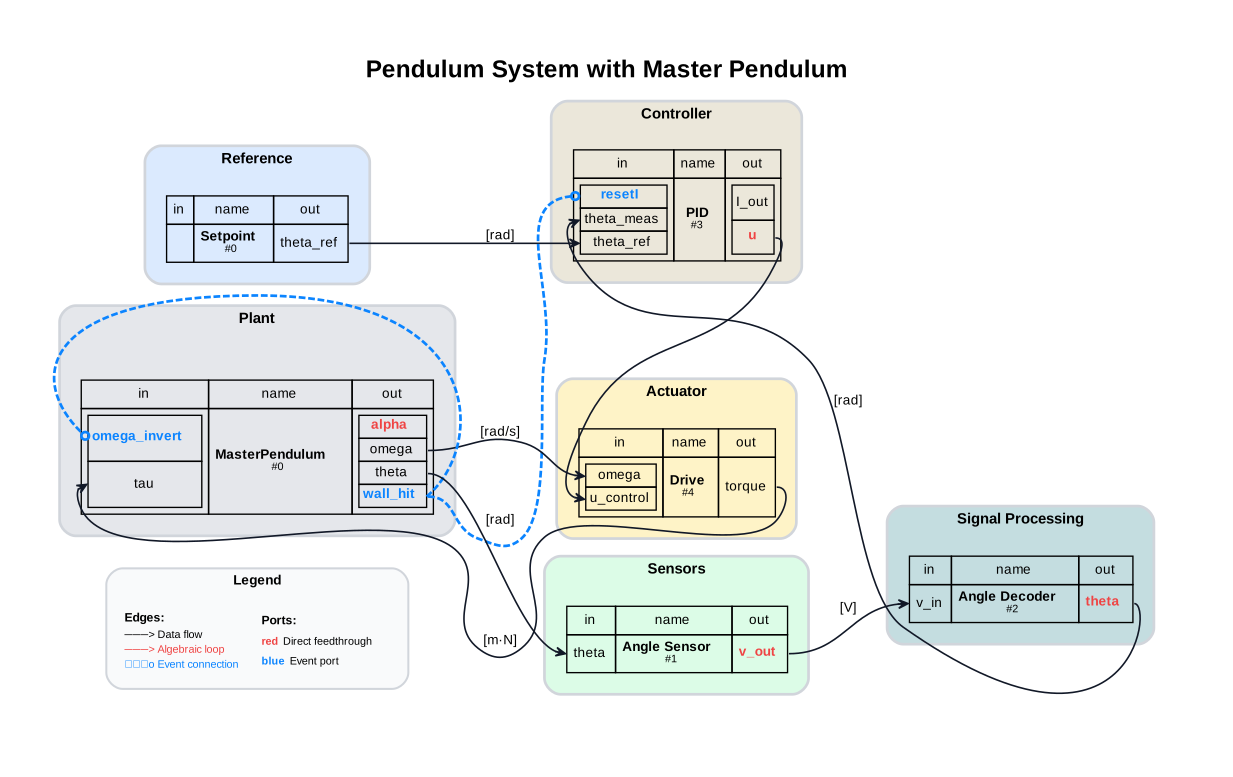
6.3. Assumptions and Scope#
Contact modeled as discrete events
Fixed-step co-simulation
6.4. Prerequisites and Setup#
import numpy as np
import pandas as pd
import matplotlib.pyplot as plt

from demos.ControlledPendulum.src.master_pendulum import MasterPendulum
import demos.ControlledPendulum.src.master_pendulum.components.fem.pendulum_config as config
from syssimx import FMUComponent, System, SystemGraphVisualizer, Connection, EventConnection
6.5. Discover FMUs#
PLATFORM = sys.platform
demo_dir_path = _repo / "demos" / "ControlledPendulum"
package_path = Path(demo_dir_path / "src/modelica/ControlledPendulum")
fmu_output_dir = Path(demo_dir_path / f"artifacts/fmus/{PLATFORM}")

fmu_paths = {}
for subdir in fmu_output_dir.iterdir():
    if subdir.is_dir():
        fmu_paths[subdir.name] = {}
        for fmu_file in subdir.glob("*.fmu"):
            fmu_paths[subdir.name][fmu_file.stem] = fmu_file
    else:
        fmu_paths[subdir.stem] = subdir
6.6. Modelica Reference Simulation#
We refer to the monolithic Modelica simulation as “Modelica” in the following. The simulation results are obtained by running the RigidContact example model in OpenModelica using the OMPython interface. The model can be found in the demos/ControlledPendulum/src/modelica/ControlledPendulum/Examples/Contact/RigidContact.mo package.
The RigidContact model and the here used co-simulation with multi-model pendulum are only to some extent comparable, as the RigidContact model includes a discrete rigid contact, while the multi-model pendulum uses the underlying FEMPendulum model with a continuous contact formulation.
However, the RigidContact model serves as a useful reference for the overall system behavior during contact and allows us to evaluate the multi-model switching approach in a realistic scenario.
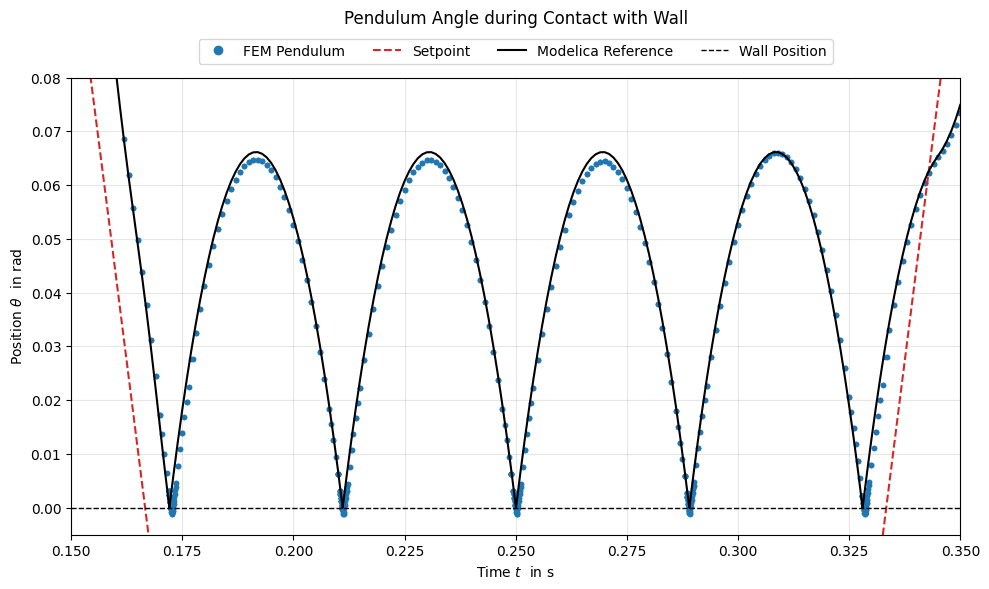
Since the FEMPendulum model uses a higly stiff contact formulation, we expect the multi-model switching approach to closely follow the reference trajectory during contact.
from OMPython import ModelicaSystem

reference = ModelicaSystem(fileName=str(package_path / "package.mo"),
                           modelName="ControlledPendulum.Examples.Contact.RigidContact")
reference.setParameters({'useReset':'true'})
reference.buildModel()
reference.simulate()
ref_sol_names = ('time', 'theta', 'theta_ref', 'theta_meas', 'pid.I_out', 'pendulum.contact')
ref_sol_reset = {name: reference.getSolutions(name).flatten() for name in ref_sol_names}
6.7. Instantiate FMU Components#
def print_parameteres(component: FMUComponent):
    print(f"Parameters of {component.name}:")
    for name, param in component.parameters.items():
        if '.' not in name and param is not None:
            print(f"  - {name}: {param}")
6.7.1. Setpoint#
setpoint = FMUComponent(name="Setpoint",
                         fmu_path=fmu_paths['Trajectories']["SetPoint"],
                         group="Reference")
print_parameteres(setpoint)
Parameters of Setpoint:
  - amplitude: 0.3490658503988659 rad
  - frequency: 3.0 Hz
  - offset: 0.0 rad
  - phase: 0.0 rad
6.7.2. PID Controller#
class PIDController(FMUComponent):
    def __init__(self, name):
        fmu_path = fmu_paths['Controllers']['PIDControllerReset_euler']
        super().__init__(name=name, fmu_path=fmu_path, group="Controller")
        self.use_reset = False  # Flag to control whether to apply reset on event

    def _handle_events_internal(self, event_names, t):
        if "wall_hit" not in event_names:
            return
        self.set_inputs({"resetI": True})
        self.do_step(t, 0)  # Perform a step to apply the resetI input
        self.set_inputs({"resetI": False})

pid = PIDController(name="PID")

print_parameteres(pid)
Parameters of PID:
  - Kd: 0.02
  - Ki: 8.0
  - Kp: 12.0
  - uMax: 1.0
  - uMin: -1.0
6.7.3. Drive#
drive = FMUComponent(name="Drive",
                     fmu_path=fmu_paths['Actuators']["DriveDynamic"],
                     group="Actuator")
print_parameteres(drive)
Parameters of Drive:
  - I_max: 10.0 A
  - L_arm: 0.000121 H
  - R_arm: 0.151 Ohm
  - V_rated: 48.0 V
  - V_supply: 16.0 V
  - eta: 0.85
  - gearRatio: 60.0
  - k_t: 0.03 m·N/A
  - n_0: 12916.0 1/min
6.7.4. Pendulum#
init_params = config.InitialConditionParameters()
init_params.angular_position_deg = 0

sim_params = config.SimulationParameters()
sim_params.tau = 0.001
sim_params.t_end = 0.4
sim_params.with_contact = True
sim_params.use_gravity = True

anim_params = config.AnimationParameters()
anim_params.animate = False

fem_parameters = {
    'init_params': init_params,
    'sim_params': sim_params,
    'anim_params': anim_params,
}

pendulum = MasterPendulum(name="MasterPendulum", initial_mode="FMU")
pendulum.set_parameters(**{"FEM": fem_parameters})
pendulum.initialize(t0=0.0)
pendulum._allow_mode_switching = True
pendulum.hysteresis.dwell_time = 0.01

def wall_contact_indicator(comp: MasterPendulum) -> float:
    theta = comp.get_outputs()["theta"]
    theta_wall = 0.0
    return theta - theta_wall

pendulum.add_event_indicator("wall_hit", func=wall_contact_indicator, direction=-1)
6.7.5. Angle Sensor and Decoder#
angle_sensor = FMUComponent(name="Angle Sensor",
                             fmu_path=fmu_paths['Sensors']['AngleSensor'],
                             group="Sensors")
print_parameteres(angle_sensor)
Parameters of Angle Sensor:
  - pot_range: 4.71238898038469 rad
  - r_bottom: 20000.0 Ohm
  - r_top: 80000.0 Ohm
  - samplePeriod: 0.01 s
  - theta_max: 0.45378560551852565 rad
  - theta_min: -0.45378560551852565 rad
  - v_adc: 3.0 V
  - v_pot: 5.0 V
  - nBits: 10
angle_decoder = FMUComponent(name="Angle Decoder",
                             fmu_path=fmu_paths['Sensors']['AngleDecoder'],
                             group="Signal Processing")

print_parameteres(angle_decoder)
Parameters of Angle Decoder:
  - pot_range: 4.71238898038469 rad
  - r_bottom: 20000.0 Ohm
  - r_top: 80000.0 Ohm
  - samplePeriod: 0.01 s
  - theta_max: 0.45378560551852565 rad
  - theta_min: -0.45378560551852565 rad
  - v_adc: 3.0 V
  - v_pot: 5.0 V
  - nBits: 10
6.8. Define Connections#
c1 = Connection(
    src_comp=setpoint.name,
    src_port=setpoint.output_specs["theta_ref"].name,
    dst_comp=pid.name,
    dst_port=pid.input_specs["theta_ref"].name,
)

c21 = Connection(
    src_comp=pendulum.name,
    src_port=pendulum.output_specs["theta"].name,
    dst_comp=angle_sensor.name,
    dst_port=angle_sensor.input_specs["theta"].name,
)

c22 = Connection(
    src_comp=angle_sensor.name,
    src_port=angle_sensor.output_specs["v_out"].name,
    dst_comp=angle_decoder.name,
    dst_port=angle_decoder.input_specs["v_in"].name,
)

c23 = Connection(
    src_comp=angle_decoder.name,
    src_port=angle_decoder.output_specs["theta"].name,
    dst_comp=pid.name,
    dst_port=pid.input_specs["theta_meas"].name,
)

c3 = Connection(
    src_comp=pid.name,
    src_port=pid.output_specs["u"].name,
    dst_comp=drive.name,
    dst_port=drive.input_specs["u_control"].name,
)

c4 = Connection(
    src_comp=drive.name,
    src_port=drive.output_specs["torque"].name,
    dst_comp=pendulum.name,
    dst_port=pendulum.input_specs["tau"].name,
)

c5 = Connection(
    src_comp=pendulum.name,
    src_port=pendulum.output_specs["omega"].name,
    dst_comp=drive.name,
    dst_port=drive.input_specs["omega"].name,
)

event_connection_1 = EventConnection(
    src_comp=pendulum.name,
    src_port="wall_hit",
    dst_comp=pendulum.name,
    dst_port=pendulum.input_specs["omega_invert"].name,
)

event_connection_2 = EventConnection(
    src_comp=pendulum.name,
    src_port="wall_hit",
    dst_comp=pid.name,
    dst_port=pid.input_specs["resetI"].name,
)

connections = [c1, c21, c22, c23, c3, c4, c5]
components  = [setpoint, pid, drive, pendulum, angle_decoder, angle_sensor]
6.9. Build and Initialize the System#
system = System(name="Pendulum System with Master Pendulum")

for comp in components:
    system.add_component(comp)

for conn in connections:
    system.add_connection(conn)

system.add_event_connection(event_connection_1)
system.add_event_connection(event_connection_2)

system.initialize(t0=0.0)

system.algorithm.record_internal_steps = False
system.algorithm.event_dedup_tol = 5e-4
system.algorithm.tol_time = 1e-5
system.algorithm.tol_value = 5e-5
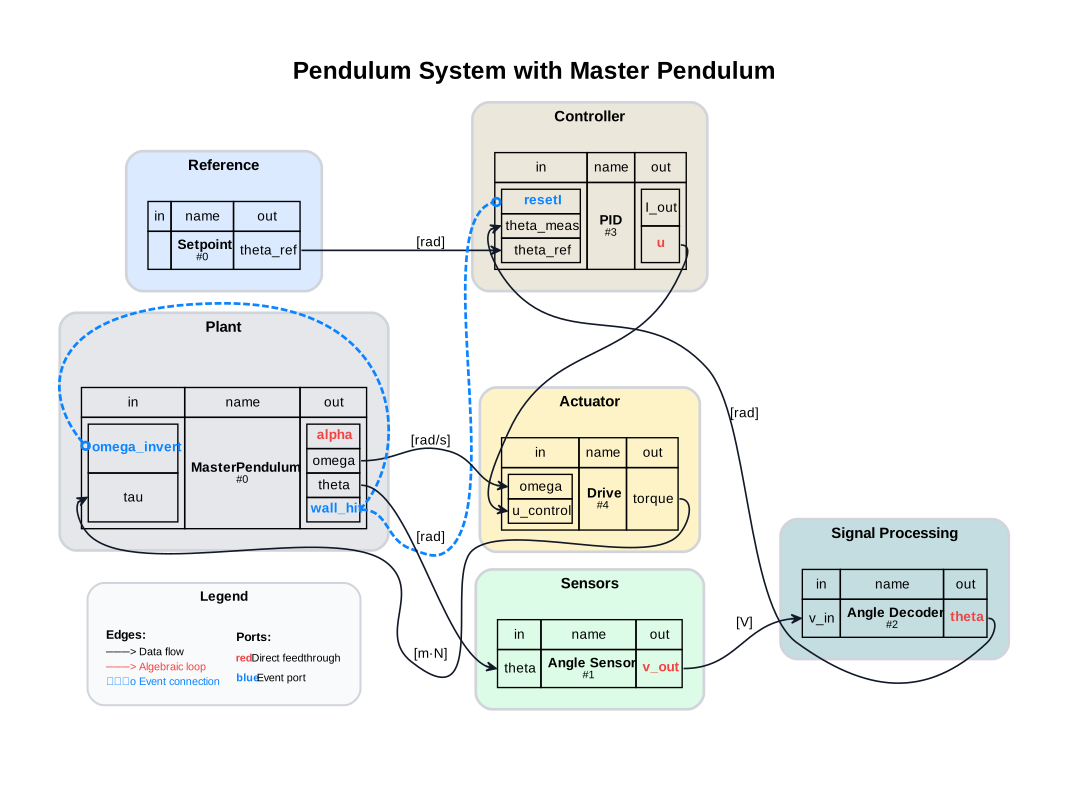
6.10. Visualize the System Graph#
visualizer = SystemGraphVisualizer(system)
visualizer.visualize()
Warning: Could not load "C:\Users\flori\anaconda3\envs\env-312\Library\bin\gvplugin_pango.dll" - It was found, so perhaps one of its dependents was not.  Try ldd.
Warning: Could not load "C:\Users\flori\anaconda3\envs\env-312\Library\bin\gvplugin_pango.dll" - It was found, so perhaps one of its dependents was not.  Try ldd.
6.11. Setup Pendulum Monitoring#
# pendulum.setup_monitoring()
# pendulum.display_monitoring()
6.12. Run Simulation#
t = 0.0
dt = sim_params.tau
t_end = sim_params.t_end

system.run(t, t_end, dt)
6.13. Collect Results#
history = system.get_history()
fem_hist = pendulum.fem.get_history()
fmu_hist = pendulum.fmu.get_history()
opensim_hist = pendulum.opensim.get_history()

ref_history = history["Setpoint"]
setpoint_time, data = ref_history
theta_ref = data["theta_ref"]

t_fem = fem_hist['theta']['time']
theta_fem = fem_hist['theta']['values']
t_fmu = fmu_hist['theta']['time']
theta_fmu = fmu_hist['theta']['values']
t_opensim = opensim_hist['theta']['time']
theta_opensim = opensim_hist['theta']['values']
event_history = history['Events']
event_times_dense = event_history[('MasterPendulum', 'wall_hit')]
event_times_float = [dt.t for dt in event_times_dense]
event_indices = np.where(ref_sol_reset['pendulum.contact'] > 0)[0]
event_times_ref_indices = np.where(ref_sol_reset['time'][event_indices] <= t_end)[0]
event_times_ref = ref_sol_reset['time'][event_indices][event_times_ref_indices][::2]

diff_event_times = np.array(event_times_float) - np.array(event_times_ref)

df_events = pd.DataFrame({
    "syssimx (s)": event_times_float,
    "Modelica (s)": event_times_ref,
    "Delta (s)": diff_event_times,
})
df_events.index.name = "Event"
df_events.style.format("{:.6f}")
| syssimx (s) | Modelica (s) | Delta (s) | |
|---|---|---|---|
| Event | |||
| 0 | 0.172463 | 0.172112 | 0.000350 |
| 1 | 0.210994 | 0.211092 | -0.000098 |
| 2 | 0.249994 | 0.250071 | -0.000077 |
| 3 | 0.288925 | 0.289050 | -0.000125 |
| 4 | 0.328338 | 0.328029 | 0.000308 |
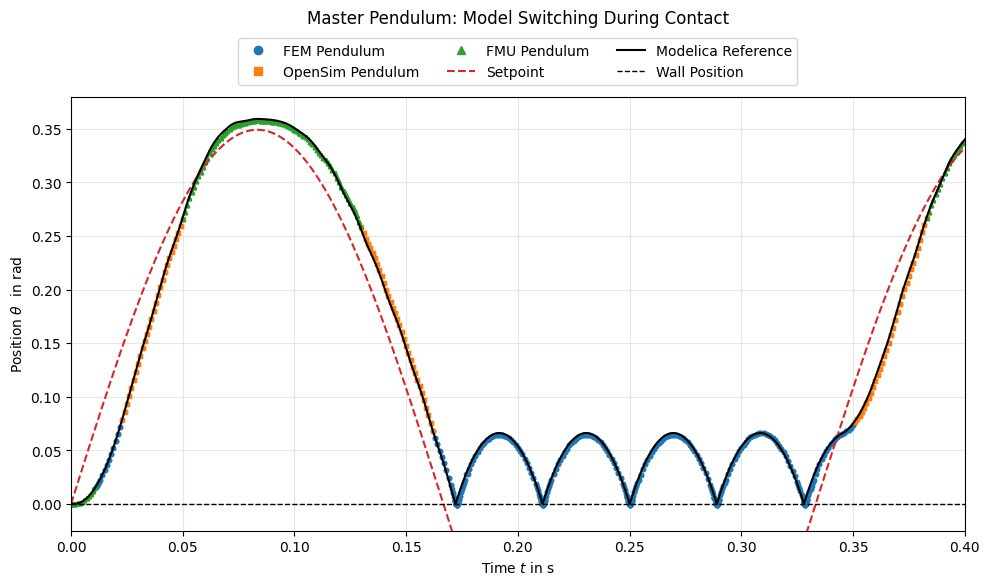
6.14. Plot: Multi-Model Switching#
This plot overlays all three sub-models and the setpoint.
6.15. Plot: Contact Windows#
6.16. Plot: PID Integrator Output#
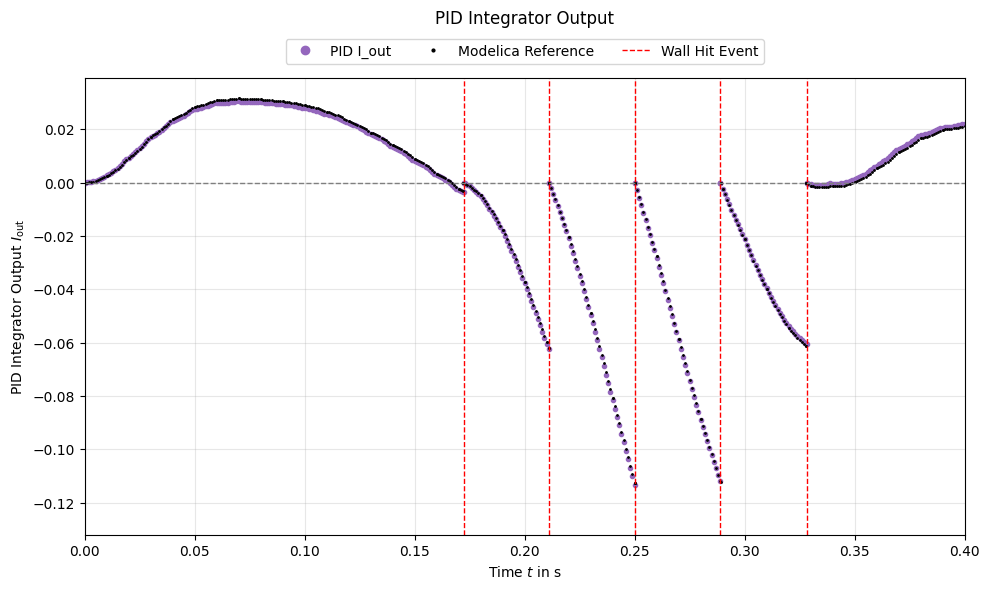
We can observe that the PID intergartor output follows closely the PID integrator trajectory of the Modelica reference.
When the pendulum hits the wall, both the PID integrator for the Modelica reference and the syssimxsimulation react to the contact event with the reset of the integrator state. The integrator starts after every contact from zero.
This enables the PID controller to react to the contact event and drive the pendulum back to the setpoint.
6.17. Summary#
The MasterPendulum switches between FMU, OpenSim, and FEM based on contact events.
Contact windows show the high-resolution FEM response.
The highly stiff FEM contact formulation closely follows the Modelica reference during contact.