

3. Simple System#
In this example, we build a small feedback system using the syssimx framework. The system consists of three components:
a constant source,
a subtractor,
and an integrator.
These components form a feedback loop, and we will simulate the system over time to observe its behavior.
3.1. Overview#
We define each component as a subclass of
CoSimComponent, specify their input/output ports, and implement their behavior.We then connect them with
Connectionobjects and run the simulation with aSysteminstance.Finally, we visualize the results using
matplotliband compare them to the analytical solution.
3.2. Learning Goals#
By completing this example, you will learn:
How to define custom co-simulation components using the
CoSimComponentbase class.How to connect components to form a system using the
Connectionclass.How to initialize and simulate a system using the
Systemclass.How to retrieve and visualize the simulation results.
3.3. Prerequisites and Setup#
We require the following packages:
syssimxnumpymatplotlib
import numpy as np
import matplotlib.pyplot as plt

from syssimx import CoSimComponent, Connection, System
from syssimx.core import PortSpec, PortType
from syssimx.viz.system_graph_visualizer import SystemGraphVisualizer
3.4. Implementation#
We start by defining the three components: ConstantSource, Subtractor, and Integrator.
3.4.1. ConstantSource Component#
This component outputs a constant real value.
We do not need to implement any specific logic in the initialization or time-stepping methods since the output is constant.
class ConstantSource(CoSimComponent):
    """A source component that outputs a constant value."""

    def __init__(self, name: str, value: float = 1.0):
        super().__init__(name, group="Source")
        self.value = value
        self.output_specs.update({"y": PortSpec(name="y", type=PortType.REAL, direction="out")})

    def _initialize_component(self, t0: float) -> None:
        pass

    def _do_step_internal(self, t: float, dt: float) -> None:
        pass

    def _update_output_states(self, t: float | None = None, event_names: list[str] | None = None):
        self.outputs["y"].set(self.value, t)
3.4.2. Subtractor Component#
This component takes two real inputs and outputs their difference (
pos - neg).The subtraction is performed in
_update_output_states.The component has no dynamic state, so
_do_step_internalis empty.The component implements
evaluate_outputsto compute direct feedthrough behavior.Direct feedthrough means an output depends on inputs in the same time step.
class Subtractor(CoSimComponent):
    """A subtractor component that subtracts its two input signals.

    diff = input1 - input2
    """
    def __init__(self, name="Subtractor"):
        super().__init__(name, group="Subtractor")
        self.input_specs.update({
            "pos": PortSpec("pos", PortType.REAL, direction="in"),
            "neg": PortSpec("neg", PortType.REAL, direction="in"),
        })
        self.output_specs.update({"diff": PortSpec("diff", PortType.REAL, direction="out")})

    def _initialize_component(self, t0: float) -> None:
        pass

    def _do_step_internal(self, t: float, dt: float) -> None:
        pass

    def _update_output_states(self, t):
        """Update the output port states based on the current input values."""
        input1_value = self.inputs["pos"].get()
        input2_value = self.inputs["neg"].get()
        self.result = input1_value - input2_value
        self.outputs["diff"].set(self.result, t)

    def evaluate_outputs(self, inputs) -> dict:
        """Evaluate outputs based on given inputs."""
        i1 = inputs.get("pos", self.inputs["pos"].get())
        i2 = inputs.get("neg", self.inputs["neg"].get())
        self.outputs["diff"].set(i1 - i2, None)
        return {"diff": i1 - i2}

    def reset(self):
        super().reset()
        self.outputs["diff"].set(0.0)
3.4.3. Integrator Component#
This component integrates its input over time using the explicit Euler method:
\[ x(t + \Delta t) = x(t) + \Delta t \cdot u(t) \]The integrator has one state variable
xupdated in_do_step_internal.The output
yis the current value ofx.
class Integrator(CoSimComponent):
    """ An integrator component that integrates its input signal u over time.

    The output y(t) is the integral of the input u(t) with respect to time
    """

    def __init__(self, name="Integrator", x0=0.0):
        super().__init__(name, group="Integrator")
        self.input_specs.update({"u": PortSpec(name="u", type=PortType.REAL, direction="in")})
        self.output_specs.update({"y": PortSpec(name="y", type=PortType.REAL, direction="out", unit=None, description="Integrated output")})
        self.x0 = x0

    def _initialize_component(self, t0: float) -> None:
        """Initialize the integrator state."""
        self.x = self.x0

    def _do_step_internal(self, t: float, dt: float) -> None:
        """Perform a simulation step by integrating the input signal."""
        u = self.inputs["u"].get()
        self.x += u * dt

    def _update_output_states(self, t):
        """Update the output port states."""
        self.outputs["y"].set(self.x, t)

    def reset(self):
        """Reset the integrator state to the initial value."""
        super().reset()
        self.x = self.x0
        self._update_output_states(self.t)
3.5. Instantiation of Components#
The three components are instantiated and stored in a list for further processing.
constant_source = ConstantSource(name="ConstSource", value=1.0)

subtractor = Subtractor(name="Subtractor")

integrator = Integrator(name="Integrator", x0=0.0)

components = [constant_source, subtractor, integrator]
3.6. Defining Connections#
Components are connected using the Connection class.
A Connection object is created for each connection between the output port of one source component and the input port of a destination component.
A Connection object takes the following parameters:
src_comp: The name (string) of the source component.src_port: The name (string) of the output port on the source component.dst_comp: The name (string) of the destination component.dst_port: The name (string) of the input port on the destination component.
c1 = Connection(src_comp=constant_source.name,
                src_port=constant_source.output_specs["y"].name,
                dst_comp=subtractor.name,
                dst_port=subtractor.input_specs["pos"].name)

c2 = Connection(src_comp=integrator.name,
                src_port=integrator.output_specs["y"].name,
                dst_comp=subtractor.name,
                dst_port=subtractor.input_specs["neg"].name)

c3 = Connection(src_comp=subtractor.name,
                src_port=subtractor.output_specs["diff"].name,
                dst_comp=integrator.name,
                dst_port=integrator.input_specs["u"].name)

connections = [c1, c2, c3]
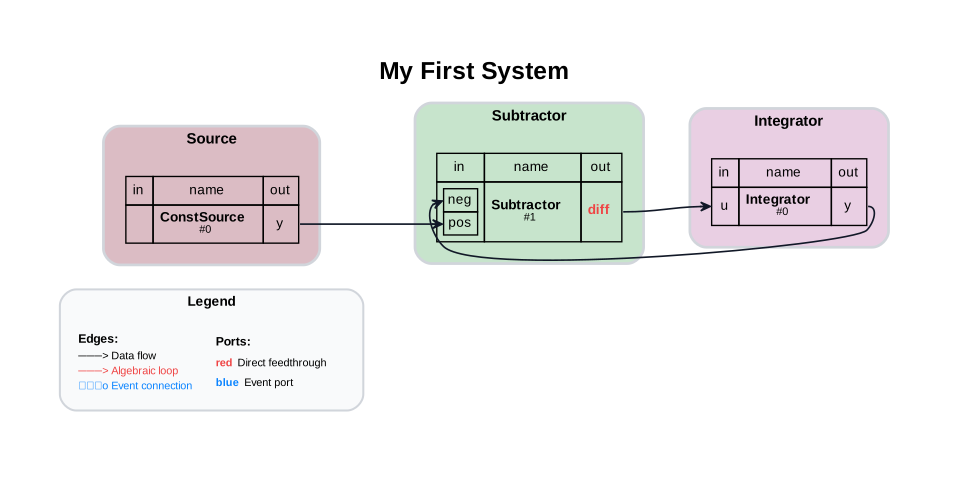
By defining these connections, we set up the following system:
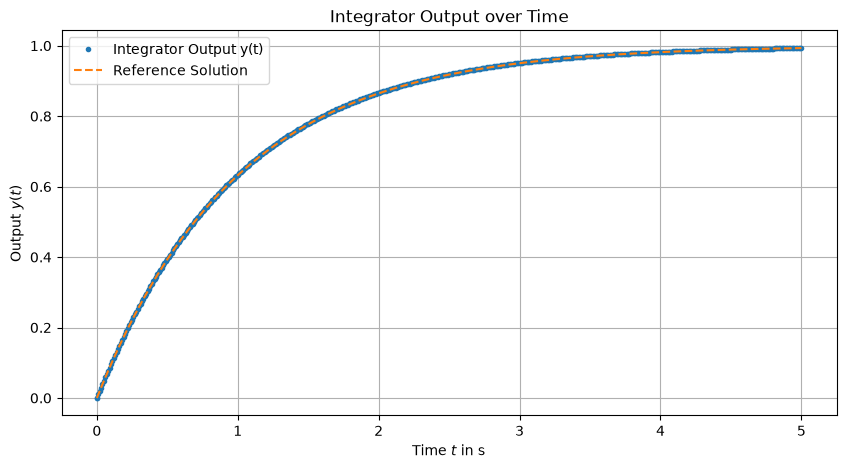
We can solve this ODE analytically. With \(\dot{y} = 1 - y\) and \(y(0) = 0\), the solution is:
3.7. Creating the System#
A System object in the syssimx framework represents a collection of interconnected CoSimComponent instances.
The main responsibilities of the System class include:
Managing the lifecycle of its components, including initialization and time-stepping
Handling the connections between components to ensure proper data flow
The following order of operations must be followed when working with a System object:
Add Components: Use
add_componentto register each component.Add Connections: Use
add_connectionto define how components are linked.Configure Parameters: Set component parameters before initialization.
Initialize the System: Call
initializeto prepare the system for simulation.
system = System(name="My First System")

for comp in components:
    system.add_component(comp)

for conn in connections:
    system.add_connection(conn)

system.initialize(t0=0.0)
3.8. Visualizing the System Graph#
The syssimx framework provides a method to visualize the system structure using graphviz.
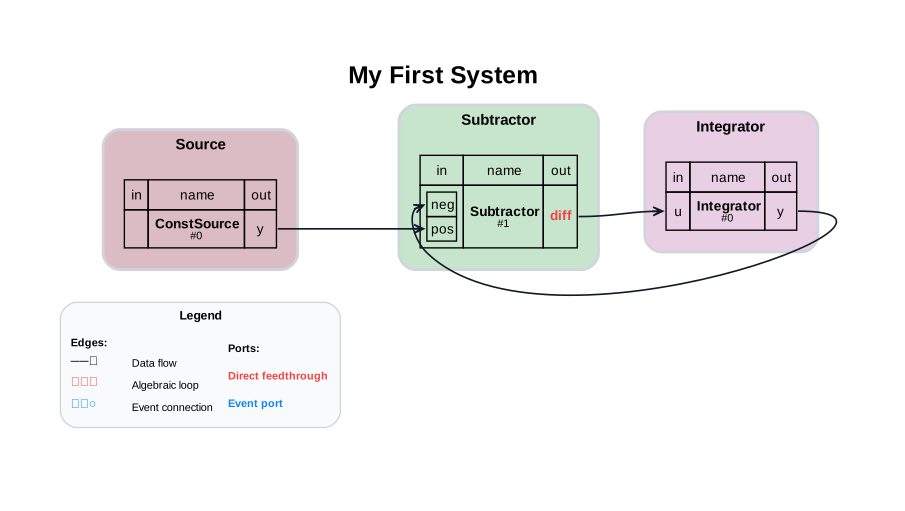
We can instantiate a SystemGraphVisualizer object with the System object and call visualize to generate a graphical representation of the system.
This visualization uses component names, group names, and connections to create a clear diagram of the system architecture.
All components list their input and output ports on the left and right sides, respectively, making it easy to understand how data flows through the system.
Direct Feedthrough Indication:
If an output port name is colored in red, it indicates that the port has direct feedthrough, meaning its output depends directly on its input during the same time step.
Execution Order:
In a co-simulation system, the execution order determines the sequence in which components are updated during each simulation step. This is important because the output of one component may depend on the input from another component. If the components are not updated in the correct order, the simulation may produce incorrect results or even fail to run.
For example, in this tutorial:
The
Subtractorhas direct feedthrough on both inputs, so it must run after its input providers.The
Integratordoes not have direct feedthrough so there is no dependency edge from Subtractor to Integrator.That yields
ConstSourceandIntegratorin the first generation andSubtractorin the second.
The syssimx framework automatically determines the correct execution order based on the connections between components. This ensures that each component receives the most up-to-date inputs during the simulation.
visualizer = SystemGraphVisualizer(system)
visualizer.visualize("first_system_graph.svg")
print(system.describe())
System 'My First System'
  Algorithm: GaussSeidelAlgorithm
  Initialized: True
  Components (3):
    - ConstSource (ConstantSource): 0 in / 1 out
    - Subtractor (Subtractor): 2 in / 1 out [direct feedthrough]
    - Integrator (Integrator): 1 in / 1 out
  Connections (3):
    - ConstSource.y -> Subtractor.pos
    - Integrator.y -> Subtractor.neg
    - Subtractor.diff -> Integrator.u
  Execution order:
    Generation 0: ConstSource, Integrator
    Generation 1: Subtractor
  Algebraic loops: none detected
The structural report from system.describe() confirms the analysis above: ConstSource and Integrator are updated first (generation 1), followed by the Subtractor (generation 2), and the direct-feedthrough relations are listed explicitly.
3.9. Running the System Simulation#
We can run the simulation using the run method of the System class. This method takes the following parameters:
t0: The starting time of the simulation.tf: The ending time of the simulation.dt: The time step size for the simulation.
t0 = 0.0
tf = 5.0
dt = 0.01

result = system.run(t0=t0, tf=tf, dt=dt)
result
<SimulationResult 'My First System' t=[0.0, 5.0] dt=0.01 components=3 algorithm=GaussSeidelAlgorithm>
3.10. Working With the Result#
system.run() returns a SimulationResult bundling the recorded histories of all components with run metadata. Indexing it with a component name returns (time_array, {port: values}); result.to_dataframe() converts everything to a pandas DataFrame, and result.to_csv() exports it.
t_vals, data = result["Integrator"]
y_vals = data["y"]
3.11. Reference Solution#
dt_ref = dt / 1000
t_ref_vals = np.arange(t0, tf + dt_ref, dt_ref)
y_ref = 1 - np.exp(-t_ref_vals)
3.12. Visualizing the Results#
3.13. Conclusion#
This example demonstrates how to create a simple feedback system with the syssimx framework: define components, connect them, inspect the structure with describe(), run the simulation, and analyze the returned SimulationResult against the analytical solution.
3.14. Next Steps#
Comparing Jacobi and Gauss-Seidel Algorithms — how the master algorithm affects accuracy in coupled systems.
Algebraic Loop System — what happens when feedback creates a zero-delay algebraic loop.
Declarative System Descriptions — build this kind of system from a YAML description instead of Python code.