

4. Declarative System Descriptions#
So far, every system was assembled in Python code. SysSimX can also build and run a system from a declarative description in YAML or JSON. This is useful when you want to:
separate the system structure from the component implementations,
run parameter or algorithm variations by editing a config file instead of code,
launch simulations from the command line or from CI without writing a script,
share a reproducible system setup as a single file.
This tutorial rebuilds the source-integrator system from the Quickstart declaratively, runs it via build_system / run_from_config, and finishes with the syssimx command-line interface.
4.1. Put the Components in an Importable Module#
The loader references component classes by their import path (module.path:ClassName), so the classes must live in a normal Python module rather than in a notebook. Any installed CoSimComponent subclass works without registration — including the built-in FMUComponent, FEMComponent, and OpenSimComponent adapters.
We write the two quickstart components to a module next to this notebook:
%%writefile quickstart_components.py
"""Components for the declarative-systems tutorial."""

from syssimx import CoSimComponent
from syssimx.core import PortSpec, PortType


class LinearSource(CoSimComponent):
    """Linear source: y(t) = a * t + b."""

    def __init__(self, name: str, a: float = 1.0, b: float = 0.0):
        super().__init__(name, group="Source")
        self.a = a
        self.b = b
        self.output_specs.update({
            "y": PortSpec(name="y", type=PortType.REAL, direction="out")
        })

    def _initialize_component(self, t0: float) -> None:
        pass

    def _do_step_internal(self, t: float, dt: float) -> None:
        pass

    def _update_output_states(self, t: float | None = None, event_names=None):
        self.outputs["y"].set(self.a * t + self.b, t)


class Integrator(CoSimComponent):
    """Integrator with explicit Euler stepping."""

    def __init__(self, name: str, x0: float = 0.0):
        super().__init__(name, group="Integrator")
        self.x0 = x0
        self.input_specs.update({
            "u": PortSpec(name="u", type=PortType.REAL, direction="in")
        })
        self.output_specs.update({
            "y": PortSpec(name="y", type=PortType.REAL, direction="out")
        })

    def _initialize_component(self, t0: float) -> None:
        self.x = self.x0

    def _do_step_internal(self, t: float, dt: float) -> None:
        u = self.inputs["u"].get()
        self.x += u * dt

    def _update_output_states(self, t: float | None = None, event_names=None):
        self.outputs["y"].set(self.x, t)
Writing quickstart_components.py
4.2. Write the System Description#
A description has up to five sections:
Section |
Purpose |
|---|---|
|
System name |
|
One entry per component: |
|
Signal connections, written as |
|
Optional event routing for hybrid systems |
|
Master algorithm: |
|
Default run settings ( |
JSON files with the same structure are equally supported (selected by the .json file extension).
%%writefile declarative_quickstart.yaml
system:
  name: QuickstartSystem

components:
  - name: LinearSource
    class: "quickstart_components:LinearSource"
    args: {a: 1.0, b: 0.0}
  - name: Integrator
    class: "quickstart_components:Integrator"
    args: {x0: 0.0}

connections:
  - src: LinearSource.y
    dst: Integrator.u

algorithm:
  type: gauss_seidel

run:
  t0: 0.0
  tf: 5.0
  dt: 0.1
Writing declarative_quickstart.yaml
4.3. Build and Inspect the System#
build_system assembles (but does not initialize) a System from the description. Invalid descriptions raise a ConfigError with a message pointing at the offending entry. The structural report shows what was assembled:
from syssimx.system import build_system

system = build_system("declarative_quickstart.yaml")
print(system.describe())
System 'QuickstartSystem'
  Algorithm: GaussSeidelAlgorithm
  Initialized: False
  Components (2):
    - LinearSource (LinearSource): 0 in / 1 out
    - Integrator (Integrator): 1 in / 1 out
  Connections (1):
    - LinearSource.y -> Integrator.u
  Execution order: not yet computed (call initialize())
  Algebraic loops: none detected
4.4. Run From the Description#
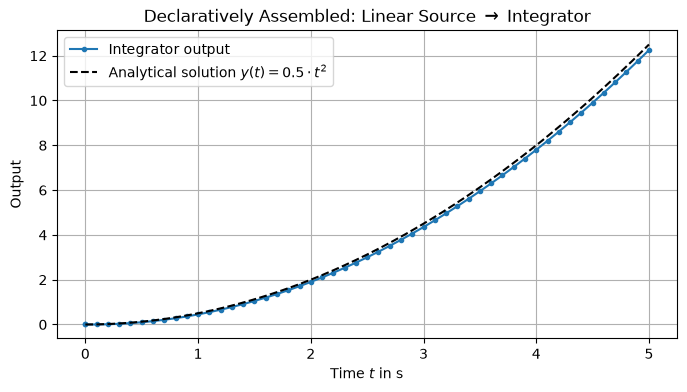
run_from_config assembles, initializes, and runs the system in one call, using the run section for the time settings, and returns the familiar SimulationResult. Individual settings can be overridden as keyword arguments, e.g. run_from_config("declarative_quickstart.yaml", tf=10.0).
from syssimx.system import run_from_config

result = run_from_config("declarative_quickstart.yaml")
result
<SimulationResult 'QuickstartSystem' t=[0.0, 5.0] dt=0.1 components=2 algorithm=GaussSeidelAlgorithm>
import matplotlib.pyplot as plt
import numpy as np

t_vals, data = result["Integrator"]
t_an = np.linspace(result.t0, result.tf, 500)

plt.figure(figsize=(8, 4))
plt.plot(t_vals, data["y"], label="Integrator output", marker=".")
plt.plot(t_an, 0.5 * t_an**2, label=r"Analytical solution $y(t) = 0.5 \cdot t^2$", color="black", linestyle="--")
plt.xlabel(r"Time $t$ in s")
plt.ylabel("Output")
plt.title("Declaratively Assembled: Linear Source $\\to$ Integrator")
plt.grid()
plt.legend()
plt.show()
4.5. The Command-Line Interface#
Installing SysSimX also installs the syssimx console script, which works directly on description files:
syssimx describe declarative_quickstart.yaml            # print the structural report
syssimx run declarative_quickstart.yaml                 # run with the file's run settings
syssimx run declarative_quickstart.yaml --tf 10 --dt 0.01   # override run settings
syssimx run declarative_quickstart.yaml -o results.csv  # export results (tidy long format)
The CLI makes modules next to the description file (and in the current directory) importable, so quickstart_components.py is found automatically. Here we invoke it as a subprocess so the output is captured in the notebook:
import subprocess
import sys

proc = subprocess.run(
    [sys.executable, "-m", "syssimx.cli", "run", "declarative_quickstart.yaml",
     "-o", "declarative_results.csv", "--quiet"],
    capture_output=True,
    text=True,
    check=True,
)
print(proc.stdout)
Completed 'QuickstartSystem': t in [0.0, 5.0] s, dt = 0.1 s, algorithm = GaussSeidelAlgorithm, wall time = 0.000 s
Results written to declarative_results.csv
4.6. Next Steps#
The
algorithmsection accepts any of the master algorithms compared in Comparing Jacobi and Gauss-Seidel Algorithms.event_connectionsroute events between components in hybrid systems — see Simple Hybrid System.Descriptions work just as well with the built-in tool adapters (
FMUComponent,OpenSimComponent,FEMComponent) — see the tool-integration tutorials, starting with Modelica / FMU.