
1. Controlled Pendulum Case Study Overview#

1.1. Purpose#

This case study is a compact, reproducible benchmark for the syssimx co‑simulation framework. It combines software, electrical, and mechanical components and is designed to stress key features:

  • co‑simulation accuracy

  • hybrid events

  • and multi‑model switching.

1.2. System Concept (Block‑Level)#

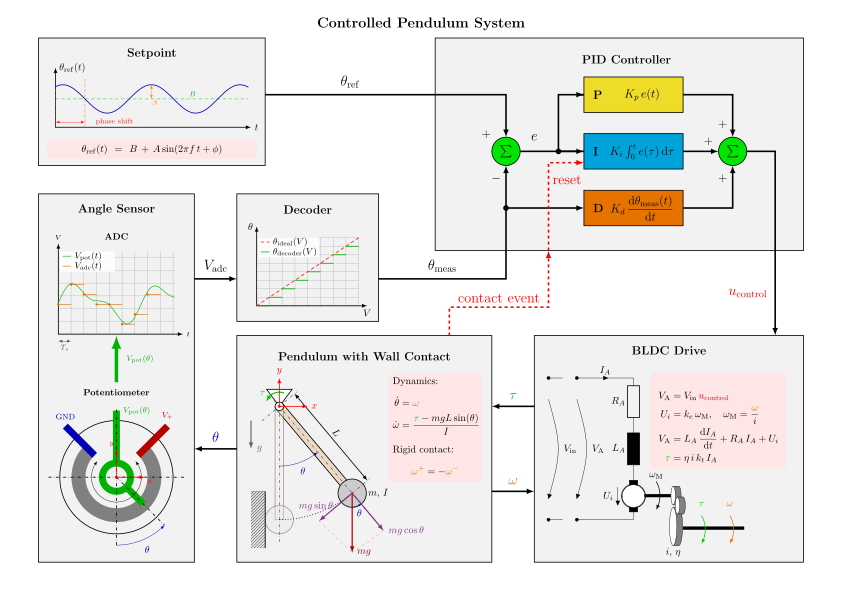
  • Setpoint: SineAngleTrajectory generates a reference angle.

  • Sensing: AnglePotentiometerADC samples the true angle and quantizes it.

  • Decoding: AnglePotentiometerDecoder reconstructs the angle from quantized voltage.

  • Control: PIDContinuous drives the tracking error to zero.

  • Actuation: DriveDynamic and DriveAdvanced convert control input into torque.

  • Plant: PendulumBase and contact variants produce the motion.

System assembly

System assembly#

Reference for system assembly diagram:

1.3. Core Component Roles#

1) SineAngleTrajectory

  • Pure software model; defines the reference trajectory used by the controller.

2) AnglePotentiometerADC

  • Sensor model with sampling and quantization; introduces realistic measurement artifacts.

3) AnglePotentiometerDecoder

  • Maps the quantized voltage back to an angle measurement for the controller.

4) PIDContinuous

  • Continuous PID with limits and optional integrator reset.

5) DriveDynamic & DriveAdvanced

  • Electrical and electromechanical drive models. DriveAdvanced creates a higher‑index coupling with the plant via shared kinematics.

6) PendulumBase and Contact Variants

  • PendulumBase is the nominal rigid‑body plant.

  • Discrete and compliant wall models introduce hybrid events and continuous contact dynamics.

1.4. Multi‑Model Pendulum (FMU, OpenSim, FEM)#

The pendulum is implemented as a multi‑model component within syssimx:

  • Modelica/FMUs for fast rigid‑body dynamics.

  • OpenSim for musculoskeletal‑style dynamics.

  • FEM for deformable‑body response near contact. Runtime switching lets the simulation use the appropriate fidelity during each phase.

1.5. Hybrid Events: Rigid Wall Contact#

A discrete contact event (rigid wall) tests the hybrid event handling of the co‑simulation master. This is used to validate event synchronization and reset behavior (e.g., PID integrator reset). Later notebooks replace the rigid wall with continuous FEM‑based contact.

1.6. Algebraic Loop (Higher‑Index Coupling)#

DriveAdvanced and Pendulum share the same coordinate and acceleration, creating a higher‑index algebraic loop. This stresses convergence, stability, and tuning of the controller under tight coupling.

1.7. Co‑Simulation Strategy#

All Modelica components are exported as Co‑Simulation FMUs and simulated with the syssimx master algorithm. The notebooks compare co‑simulation trajectories to monolithic Modelica reference solutions to validate accuracy and convergence.

1.8. Notebook Roadmap#

  • Baseline: FMU‑only closed loop vs monolithic reference.

  • Quantization: sampling/ADC resolution effects.

  • Algebraic Loop: drive‑pendulum coupling and PID sensitivity.

  • Rigid Contact: hybrid events and convergence with step size.

  • Multi‑Model Switching: FMU/OpenSim/FEM switching during contact.

1.9. Why This Demo Matters#

This “simple” controlled pendulum covers the essential capabilities of syssimx:

  • heterogeneous components,

  • hybrid events,

  • multi‑model switching, and

  • quantitative validation against monolithic references.