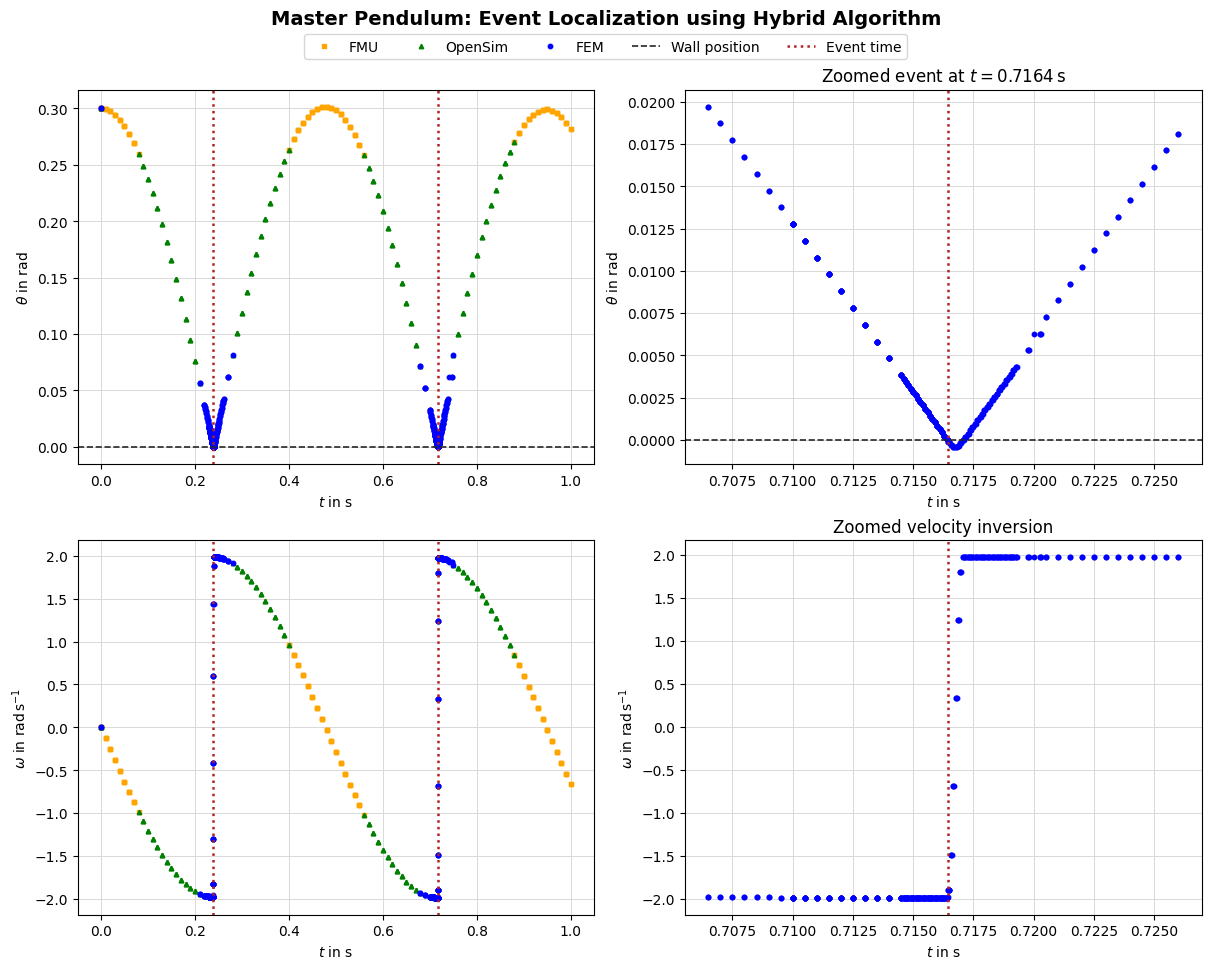

2. Master Pendulum: Switching and Contact-Aware Modes#
This notebook uses the actual MasterPendulum class to demonstrate mode selection,
hysteresis, and contact-aware switching.
2.1. Overview#
Configure a contact-enabled FEM pendulum as the reference model.
Instantiate
MasterPendulumand initialize it.Set a contact-aware
mode_selectorand hysteresis.Simulate and inspect synchronization events.
2.2. Learning Goals#
Understand how to configure the
MasterPendulumfor contact-aware switching.Understanding effects of hysteresis and dwell time on mode switching.
2.3. Prerequisites#
You should be familiar with the FMU, OpenSim, and FEM pendulum components. This notebook focuses on switching behavior and does not re-derive the models.
import numpy as np
import matplotlib.pyplot as plt

from demos.ControlledPendulum.src.master_pendulum.orchestration.master_pendulum import MasterPendulum
from demos.ControlledPendulum.src.master_pendulum.components.fem import pendulum_config as config
from syssimx.core.multi_comp import Hysteresis
from syssimx import System
from syssimx.system.connection import EventConnection
import logging

logging.basicConfig(
    level=logging.WARNING,  # keep third-party loggers quiet
    format="[%(module)s] %(levelname)s: %(message)s",
)
# Enable debug output for the syssimx package
logging.getLogger("syssimx").setLevel(logging.DEBUG)
2.4. Configure FEM Parameters#
We enable contact so the MasterPendulum uses its contact-aware switching logic.
The FEM model acts as the reference for mass/inertia/length synchronization.
mesh_params = config.MeshParameters()

init_params = config.InitialConditionParameters()
init_params.angular_position_deg = np.rad2deg(0.3) # Initial angle

sim_params = config.SimulationParameters()
sim_params.tau = 0.01
sim_params.t_end = 1
sim_params.with_contact = True
sim_params.use_gravity = True

contact_params = config.ContactParameters()
contact_params.kn = 2e9

anim_params = config.AnimationParameters()
anim_params.animate = False

fem_parameters = {
    'contact_params': contact_params,
    'init_params': init_params,
    'sim_params': sim_params,
    'anim_params': anim_params,
    'mesh_params': mesh_params,
}
2.5. Instantiate MasterPendulum#
Initialization will:
initialize FEM first,
synchronize parameters to FMU and OpenSim,
select the contact-aware mode selector if contact is enabled.
pendulum = MasterPendulum(name="MasterPendulum", initial_mode="FMU")

pendulum.set_parameters(**{"FEM": fem_parameters})
pendulum.initialize(t0=0.0)
def wall_contact_event_indicator(pendulum: MasterPendulum):
    theta_wall = 0
    theta_pendulum = pendulum.get_outputs()['theta']
    return theta_pendulum - theta_wall

pendulum.add_event_indicator(name="wall_hit",
                             func=wall_contact_event_indicator,
                             direction=-1)
2.6. Mode Selector and Hysteresis#
We are using the default mode selector to use contact gap distance for switching.
In this scenario the MasterPendulum will switch to FMU mode when the pendulum is far from the wall, in the intermediate gap range it will use the OpenSim model, and when in contact it will use the FEM model.
This kind of mode selector is computationally expensive since it requires for each step to update the internal grid functions of the FEM model to compute the contact gap distance. In practice, you would likely want to use a more efficient switching criterion (e.g. based on the pendulum angle or velocity) and only update the FEM state and compute the gap distance when close to the wall.
If there is no contact, the mode selector will return “FMU”.
    def _gap_based_mode_selector(self, t: float, state: dict[str, Any]) -> str:
        """
        Select mode based on current angular position (theta) with hysteresis to prevent rapid switching.
        """
        theta_value = self.outputs["theta"].get()
        if theta_value is None:
            return self.active_mode  # not yet initialized; keep current mode
        theta = theta_value.magnitude if hasattr(theta_value, "magnitude") else float(theta_value)

        theta_abs_deg = abs(np.rad2deg(theta))

        # Mode selection based on angular position thresholds
        if theta_abs_deg > 15:
            return "FMU"
        elif theta_abs_deg > np.rad2deg(0.075):
            return "OpenSim"
        else:
            return "FEM"
Additionally, we set a hysteresis dwell time to prevent rapid switching when the pendulum is near the switching thresholds.
dwell_time = 0.05
pendulum.hysteresis = Hysteresis(dwell_time=dwell_time)
2.7. Setup System#
system = System(name="PendulumSystem")

system.add_component(pendulum)

event_connection = EventConnection(
    src_comp=pendulum.name, src_port=pendulum.output_specs['wall_hit'].name,
    dst_comp=pendulum.name, dst_port=pendulum.input_specs['omega_invert'].name
)

system.add_event_connection(event_connection)
2.8. Simulate and Record Synchronization Events#
We step the system, log the active mode, and inspect sync_events to verify
that switching preserves the shared state.
pendulum.setup_monitoring()
pendulum.display_monitoring()
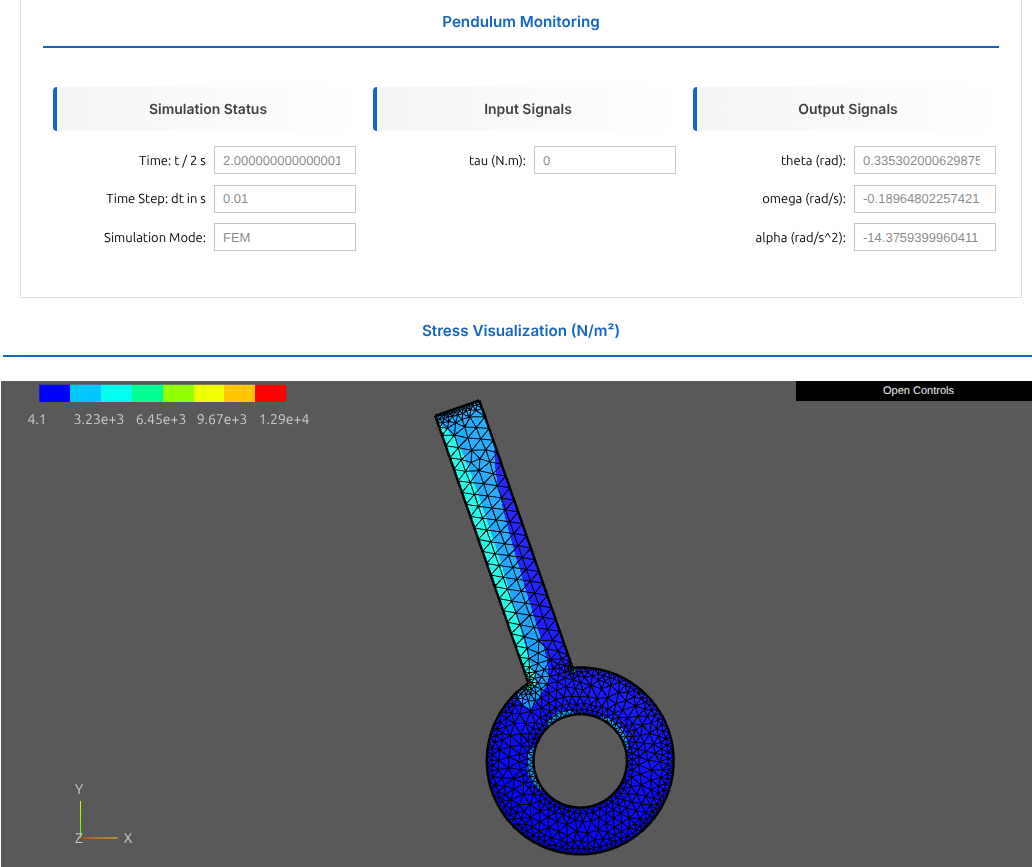
Figure: Pendulum Monitoring Dashboard
The figure abve shows the pendulum monitoring dashboard, which includes:
Simulation Status:
Current time and final time \(t\).
Current time step size \(dt\).
Active mode (FMU, OpenSim, or FEM).
Input Signals:
Current applied torque \(\tau\).
Output Signals:
Angular position \(\theta\)
Angular velocity \(\dot{\theta}=\omega\)
Angular acceleration \(\ddot{\theta}=\alpha\)
Stress Visualization:
The current noralized Second Piola-Kirchhoff stress distribution in the FEM model, which indicates where the pendulum is experiencing high stress (e.g. due to contact with the wall or due to the torque application).
system.initialize(t0=0.0)

system.algorithm.record_internal_steps = False
system.algorithm.event_dedup_tol = 5e-4
system.algorithm.tol_time = 1e-5
system.algorithm.tol_value = 5e-5
system.run(t0=0.0, tf=sim_params.t_end, dt=sim_params.tau)
[system] INFO: Starting simulation run from t=0.0 to t=1 with dt=0.01
[multi_comp] INFO: [MasterPendulum] Switching: FMU to OpenSim @ t=0.0700s
[multi_comp] INFO: [MasterPendulum] Switching: OpenSim to FEM @ t=0.2000s
[hybrid] DEBUG: Internal hint: MasterPendulum.wall_hit in [0.23900000, 0.23910000]
[hybrid] INFO: ================================================================================
[hybrid] INFO: Event crossing in [0.230000, 0.240000]: MasterPendulum.wall_hit
[hybrid] DEBUG:   Internal hints from MasterPendulum: ['wall_hit']
[hybrid] DEBUG: Starting bisection for event localization ...
[hybrid] DEBUG: Narrowed interval via hint: [0.230000, 0.240000] -> [0.239000, 0.239100]
[hybrid] DEBUG: Indicators at left  (t=0.23900000): {'MasterPendulum': {'wall_hit': 4.728273506212375e-06}}
[hybrid] DEBUG: Indicators at right (t=0.23910000): {'MasterPendulum': {'wall_hit': -0.00018536577093318396}}
[hybrid] DEBUG: Bisection iteration 1: interval [0.23900000, 0.23910000]
[hybrid] DEBUG: Bisection iteration 2: interval [0.23900000, 0.23905000]
[hybrid] DEBUG: Indicator MasterPendulum.wall_hit = -1.8537e-04
[hybrid] INFO: Event located at t=0.23902500
[hybrid] DEBUG:   Events at located time: MasterPendulum.wall_hit
[hybrid] INFO: Handling 1 event(s) at t=0.23902500, micro=0: MasterPendulum.wall_hit
[hybrid] DEBUG: Events grouped by listener: {'MasterPendulum': ['wall_hit']}
[hybrid] INFO: ================================================================================
[FEM_Pendulum] Event 'wall_hit' at t=0.239025s.
[multi_comp] INFO: [MasterPendulum] Switching: FEM to OpenSim @ t=0.2700s
[multi_comp] INFO: [MasterPendulum] Switching: OpenSim to FMU @ t=0.3900s
[multi_comp] INFO: [MasterPendulum] Switching: FMU to OpenSim @ t=0.5500s
[multi_comp] INFO: [MasterPendulum] Switching: OpenSim to FEM @ t=0.6700s
[hybrid] DEBUG: Internal hint: MasterPendulum.wall_hit in [0.71640000, 0.71650000]
[hybrid] INFO: ================================================================================
[hybrid] INFO: Event crossing in [0.710000, 0.720000]: MasterPendulum.wall_hit
[hybrid] DEBUG:   Internal hints from MasterPendulum: ['wall_hit']
[hybrid] DEBUG: Starting bisection for event localization ...
[hybrid] DEBUG: Narrowed interval via hint: [0.710000, 0.720000] -> [0.716400, 0.716500]
[hybrid] DEBUG: Indicators at left  (t=0.71640000): {'MasterPendulum': {'wall_hit': 5.79313042364005e-05}}
[hybrid] DEBUG: Indicators at right (t=0.71650000): {'MasterPendulum': {'wall_hit': -0.00013600643600009254}}
[hybrid] DEBUG: Bisection iteration 1: interval [0.71640000, 0.71650000]
[hybrid] DEBUG: Indicator MasterPendulum.wall_hit = -1.3601e-04
[hybrid] INFO: Event located at t=0.71645000
[hybrid] DEBUG:   Events at located time: MasterPendulum.wall_hit
[hybrid] INFO: Handling 1 event(s) at t=0.71645000, micro=0: MasterPendulum.wall_hit
[hybrid] DEBUG: Events grouped by listener: {'MasterPendulum': ['wall_hit']}
[hybrid] INFO: ================================================================================
[FEM_Pendulum] Event 'wall_hit' at t=0.716450s.
[multi_comp] INFO: [MasterPendulum] Switching: FEM to OpenSim @ t=0.7400s
[multi_comp] INFO: [MasterPendulum] Switching: OpenSim to FMU @ t=0.8700s
[system] INFO: Simulation completed in 226.57 seconds
pendulum.fem.animate_stress()
2.9. Visualize Mode Switching#
history = system.get_history()
pendulum_history = history["MasterPendulum"]
event_history = history["Events"]

t_vals, data = pendulum_history
q_vals = data["theta"]
omega_vals = data["omega"]
alpha_vals = data["alpha"]

t_vals_fem, data_fem = pendulum.fem.get_history_arrays()
q_vals_fem = data_fem["theta"]
omega_vals_fem = data_fem["omega"]
t_vals_opensim, data_opensim = pendulum.opensim.get_history_arrays()
q_vals_opensim = data_opensim["theta"]
omega_vals_opensim = data_opensim["omega"]
t_vals_fmu, data_fmu = pendulum.fmu.get_history_arrays()
q_vals_fmu = data_fmu["theta"]
omega_vals_fmu = data_fmu["omega"]

# Get event times
event_times = event_history.get(("MasterPendulum", "wall_hit"), [])
t_event = event_times[0] if event_times else None

print(f"\nDetected {len(event_times)} events")
if t_event:
    print(f"First event at t = {t_event.t:.8f} s")
Detected 2 events
First event at t = 0.23902500 s